Git hosts
Overview
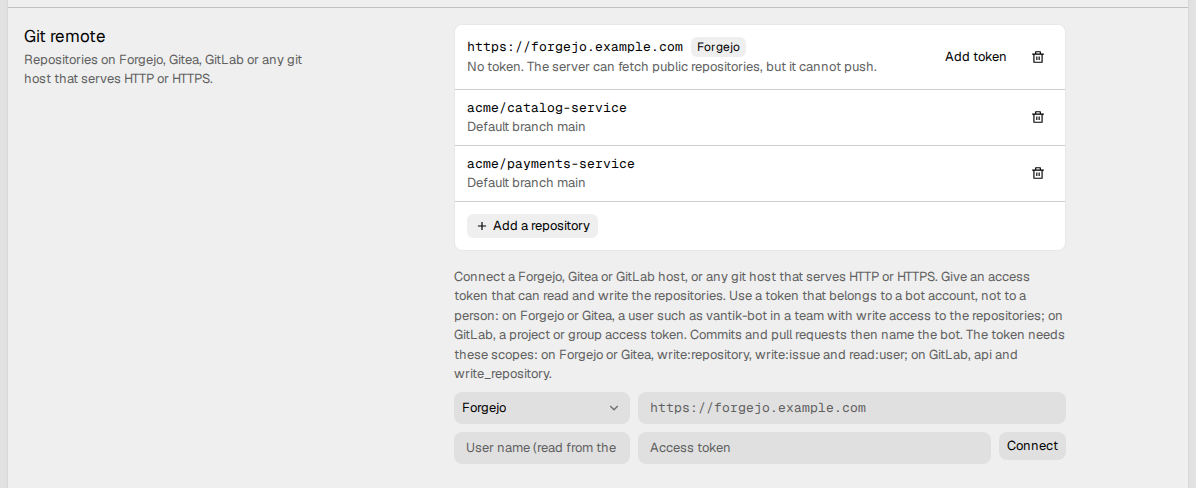
The Git remote integration connects Vantik to a git host that is not GitHub. Use it for Forgejo, Gitea or GitLab. You can also use it for a different host that serves git over HTTP or HTTPS.
The repositories of a git host are a source for modules. An agent run reads the code of its module from them, and pushes its branch to them. Read How to link a module to a repository.
A git host connects with an access token, not with OAuth. The workspace can connect more than one host. Each host is one connection with one token.
Only a workspace admin can connect a host, add a repository, or remove one. Each member can see the connections.
Use a bot account
Make the token for a bot account, not for a person. Commits and pull requests then show the name of the bot.
- On Forgejo or Gitea, make a user, for example
vantik-bot. Put the user in a team that has write access to the repositories. Then make a token for that user. - On GitLab, make a project access token or a group access token.
The scopes of the token
The token must have these scopes:
| Host | Scopes |
|---|---|
| Forgejo or Gitea | write:repository, write:issue and read:user |
| GitLab | api and write_repository |
When you connect, Vantik checks only that the token can read its own user.
On Forgejo and Gitea, this needs the read:user scope. Vantik does not check
the other scopes then. A token without them connects, but a later push or
pull request fails.
If the host refuses a call and says which scope the token does not have, Vantik shows that scope. For example:
Vantik cannot use this token on https://forgejo.example.com: the token is missing the scope "read:user". Make a token that has it.
If the host does not name the scope, Vantik tells you to give the token the scopes in the connect form. Make a new token that has the scopes, and connect again.
Vantik does not check the token of an Other git host.
How to connect a host
- Open Settings → Integrations, and click View on Git remote.
- Select the kind of host: Forgejo, Gitea, GitLab or Other git host.
- Type the address of the host, for example
https://forgejo.example.com. The address must usehttporhttps. - Optional: type the User name. For Forgejo, Gitea and GitLab, Vantik reads the user name from the token if you leave it empty.
- Paste the Access token.
- Click Connect.
The row of the host then shows the user of the token and the last four characters of the token. For Forgejo, Gitea and GitLab, the row also shows Commits as with the name and the email of the user of the token.
Vantik encrypts the token before it stores it. It never shows the token again.
A host without a token
You can connect a host without a token. Then the server can fetch only the public repositories. It cannot push a branch, and it cannot open a pull request. To add a token later, click Add token on the row of the host.
How to add a repository
For Forgejo, Gitea and GitLab:
- Click Add a repository below the host.
- Find the repository in the list, and select it.
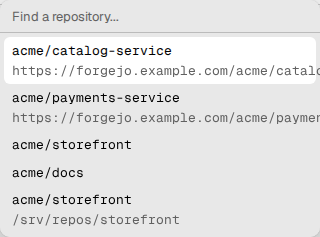
The list shows the repositories that the token can read. A private repository shows private.
For an Other git host, type the clone address of the repository, for
example https://git.example.com/owner/name.git. Then click Add. The
address must be on the host that you connected.
Before Vantik adds a repository, the server runs git ls-remote on it. If
the server cannot reach it, Vantik does not add it and shows the reason. The row
of the repository then shows its default branch.
How to use a repository in a module
A repository of a host shows in the Connect a repository list on the page of a module. The list holds the repositories of each source of the workspace. Below the name of a repository on a git host, the list shows its web address.
Read How to link a module to a repository.
What Vantik does with the repositories
- Agent runs. The server pushes the branch of a run to the repository. On Forgejo, Gitea and GitLab, it then opens a pull request. The title of the pull request is the issue key and the issue title. On an Other git host, the run delivers only the branch.
- The repository mirror. The server keeps its own copy of each repository. Read The repository mirror.
How to change or remove a connection
- To change the token, click Change token on the row of the host. Paste the new token, and click Save.
- To remove a repository, click the delete button on its row.
- To disconnect the host, click the delete button on the row of the host. Vantik then deletes the token.
When you disconnect a host, a module keeps its link to a repository of that host. But Vantik cannot use the repository until you connect the host again. If you connect the same address again, its repositories come back.
Vantik does not support SSH. Use an HTTP or HTTPS address.