Sub-issues and relations
Overview
An issue can have a parent issue and sub-issues. An issue can also have a relation to a different issue. These are the relations:
| Relation | The other side shows |
|---|---|
| Blocks | Blocked by |
| Duplicate of | Duplicated by |
| Related to | Related to |
When you add a relation to one issue, Vantik adds the other side to the other issue.
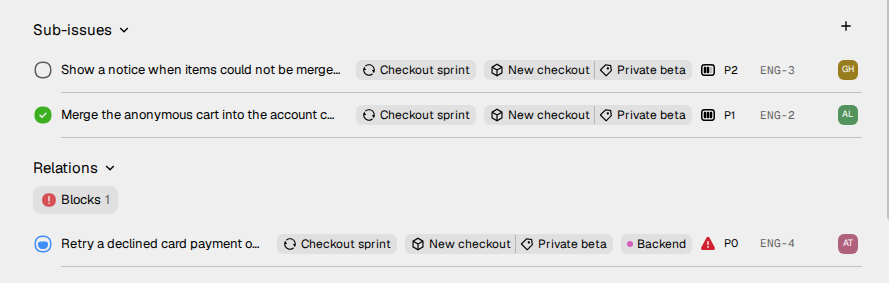
How to add a sub-issue
Use one of these methods:
- A new sub-issue. On the issue page, click + next to Sub-issues. The new issue dialog opens. The new issue gets this issue as its parent.
- From the description. Select text in the description of the issue. Then click the button whose tooltip is Create sub issue. Vantik makes a sub-issue from the selected text, in the backlog. The text becomes a link to the new issue.
- An issue that exists. Open the menu of the issue, and select Add related. Then select Parent of..., and select the sub-issue.
- In the new issue dialog. Click + in the property row, and select Create sub-issue. Vantik creates the sub-issues with the issue.
To give an issue a parent, open its menu, select Add related, and select Sub-issue of.... To remove the parent, open the menu and select Remove parent issue.
How to add a relation
- Open the issue.
- Open the menu of the issue, and select Add related.
- Select Related to..., Blocked by..., Blocks... or Duplicate of....
- Find the other issue in Search for issue..., and select it.
The search in this dialog finds an issue by its number and its title. It does
not find an issue by its key, for example ENG-12. Type 12 instead.
A team of the support type has fewer items. It has no Parent of..., Sub-issue of... or Blocks....
When a person adds a Blocks or a Blocked by relation to an issue, the subscribers of the issue get a notification. Read Inbox and notifications.
Where the sub-issues and relations show
On the issue page:
- A sub-issue shows Sub-issue of and its parent below its title.
- Sub-issues lists the sub-issues. Relations lists the issues that block this issue, that it blocks, that duplicate it, and that are related to it. Both lists are closed until you click them. While a list is closed, a count shows next to it.
- At the right, below the assignee, each relation shows under its name: Blocking, Blocked by, Duplicate of, Duplicated by or Related.
In the list and on the board:
- A sub-issue shows Parent and the parent issue. Click it to open the parent.
- Blocked by and Blocks show the number of issues, in red and in orange.
- In the list, Sub-issue shows the number of sub-issues.
- On the board, Sub-issues shows the number of sub-issues. The board shows it only if the issue also has a parent, or a Blocks or Blocked by relation.
In the list, click Blocked by, Blocks or Sub-issue to show those issues below the row. A related issue and a duplicate do not show in the list or on the board.
To hide the sub-issues in a list, turn off Show sub-issues in Display options. Read Issues.
How to remove a relation
On the issue page, at the right, put the pointer on the related issue. Then click the X icon.
Similar issues
Vantik also finds similar issues for an issue in triage. These do not show in Relations. Read Triage.