Search
Overview
Search finds issues and the knowledge bank from one box.
To open search, use one of these methods:
- Press
⌘ /on a Mac, orCtrl /on a different computer. - Click Search at the top of the sidebar. The button shows
⌘/. Its tooltip is Search issues (⌘ + /). In a narrow sidebar, the button shows only the search icon.
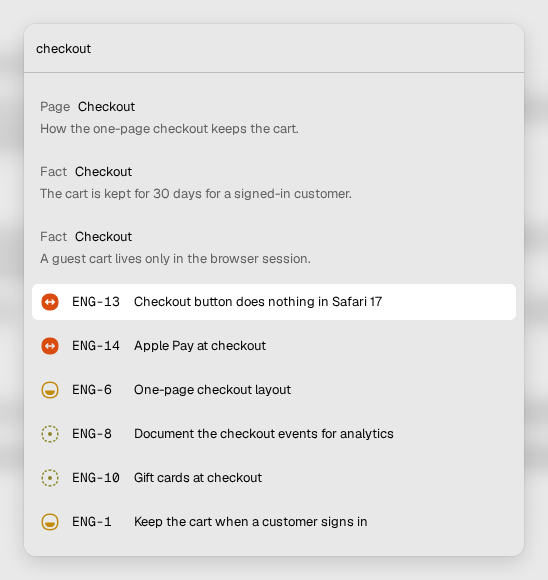
How to search
- Open search.
- Type your query in Type a command or search....
- Wait a short time. Vantik starts the search approximately half a second after you type the last character.
- Select a result to open it.
If nothing agrees with the query, the dialog shows No results found.
The dialog has no filters. To filter the issues, use the Filter control of a list. Read Views.
The results
The results of the knowledge bank show first. Each one shows its kind:
- Page: a page of the knowledge bank.
- Fact: an entry of the knowledge bank.
- Evidence: an entry that supports a different entry.
A fact that is outside a page shows Outside any page. When you select it, Vantik opens the Pages home. Read Knowledge.
The issues show after the knowledge results. Each issue shows its status icon, its key and its title. Vantik shows a maximum of 10 issues.
What search finds
Search finds an issue by these parts of the issue:
- The title.
- The description.
- The comments.
A match in the title counts more than a match in the description. A match in the description counts more than a match in a comment.
Search finds a word, the start of a word, and a word with a small spelling
error. It also finds an issue by the start of its key or of its number. For
example, ENG-12 finds ENG-12, and it also finds ENG-120.
Search shows only the issues of your teams. It shows the pages of the knowledge bank for the full workspace.
Search by meaning
Your instance can also find issues by meaning. This needs an embedding model.
The operator sets EMBEDDINGS_SOURCE to local or to hosted. Then search
finds an issue that has the same meaning as the query, with different words.
If EMBEDDINGS_SOURCE has no value, search finds only the words of the query.