The Gardener
Overview
The gardener is the set of background jobs that keep the knowledge bank current. The jobs check, settle and archive what agents write. The Gardener screens show what the jobs did. They do not let you change it: you decide in Needs you.
When a job must act as a user, for example to open an issue, it acts as the bot member Knowledge gardener.
The Gardener screens are for people only. The server refuses each Gardener request from an agent.
How to open the Gardener
- On the Pages home, click Gardener in the What the workspace knows card. The label also shows when the gardener last did something.
- In Needs you, click Settled by agents.
The sidebar has no Gardener item.
The Gardener screen
The screen shows the triage mode, Triage: on, Triage: shadow or Triage: off. Read Triage and escalation.
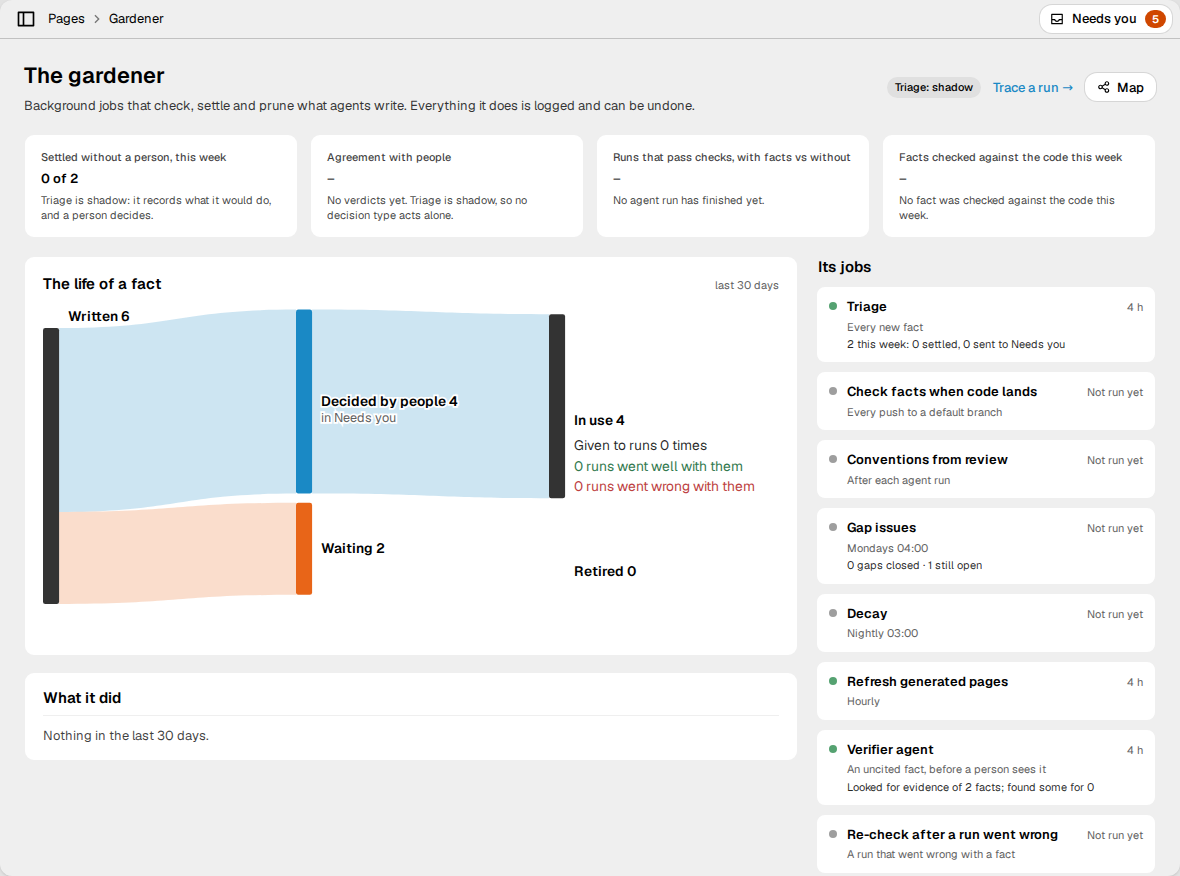
Four figures come first:
| Figure | What it shows |
|---|---|
| Settled without a person, this week | How many of this week's triage decisions needed no person. |
| Agreement with people | The kappa between triage and people. Read Agreement. |
| Runs that pass checks, with facts vs without | The share of runs whose checks passed, in each arm of the holdout. Below 10 runs without facts, it says that the sample is too small. |
| Facts checked against the code this week | The share of code citations that still hold or that moved. |
Below them:
- The life of a fact follows the facts that agents wrote in the last 30 days. It shows how many were refused, folded into a repeat, settled by agents, decided by people, or that still wait. It then shows how many are in use, how often runs got them, how many runs went well or wrong with them, and how many were retired, and why.
- What it did lists the last 12 actions of the gardener in the last 30 days, the newest first. An action that waits for a person has an Open link to its item in Needs you. An action that a person undid says so.
- Its jobs lists each job, when it runs, and what it did this week. A grey dot means that the job did not run yet. A red dot means that a run of the job failed this week, and the row shows the error.
| Job | When it runs |
|---|---|
| Triage | Every new fact. |
| Check facts when code lands | Every push to a default branch. Read Checks when the code changes. |
| Conventions from review | After each agent run. Read Upkeep. |
| Gap issues | On KNOWLEDGE_GAP_ISSUES_CRON. Read Upkeep. |
| Decay | On PAGE_DECAY_CRON. Read Decay. |
| Refresh generated pages | On KNOWLEDGE_PAGE_REFRESH_CRON. Read Generated pages. |
| Verifier agent | A fact with no evidence, before a person sees it. Read The verifier. |
| Re-check after a run went wrong | A run that went wrong with a fact. |
| Read citations again | A citation that the server could not read. |
Note: The Its jobs list always shows the default schedules: "Mondays 04:00", "Nightly 03:00" and "Hourly". It does not show a schedule that the operator changed, or a job that the operator turned off.
The decay job also does more than decay. Each night it also does these things:
- It puts provisional facts that runs used well into full use.
- It asks a person about confirmed facts that nobody used.
- It opens the correction issues that a failed run owed.
- It asks the verifier about the facts that wait with no evidence.
- It queues triage again for the facts that wait with no decision that triage acted on.
- It queues a new read of the outside pages that it last read over 30 days ago.
The map
The map draws the knowledge of the workspace as a graph. Click Map on the Gardener screen to open it.
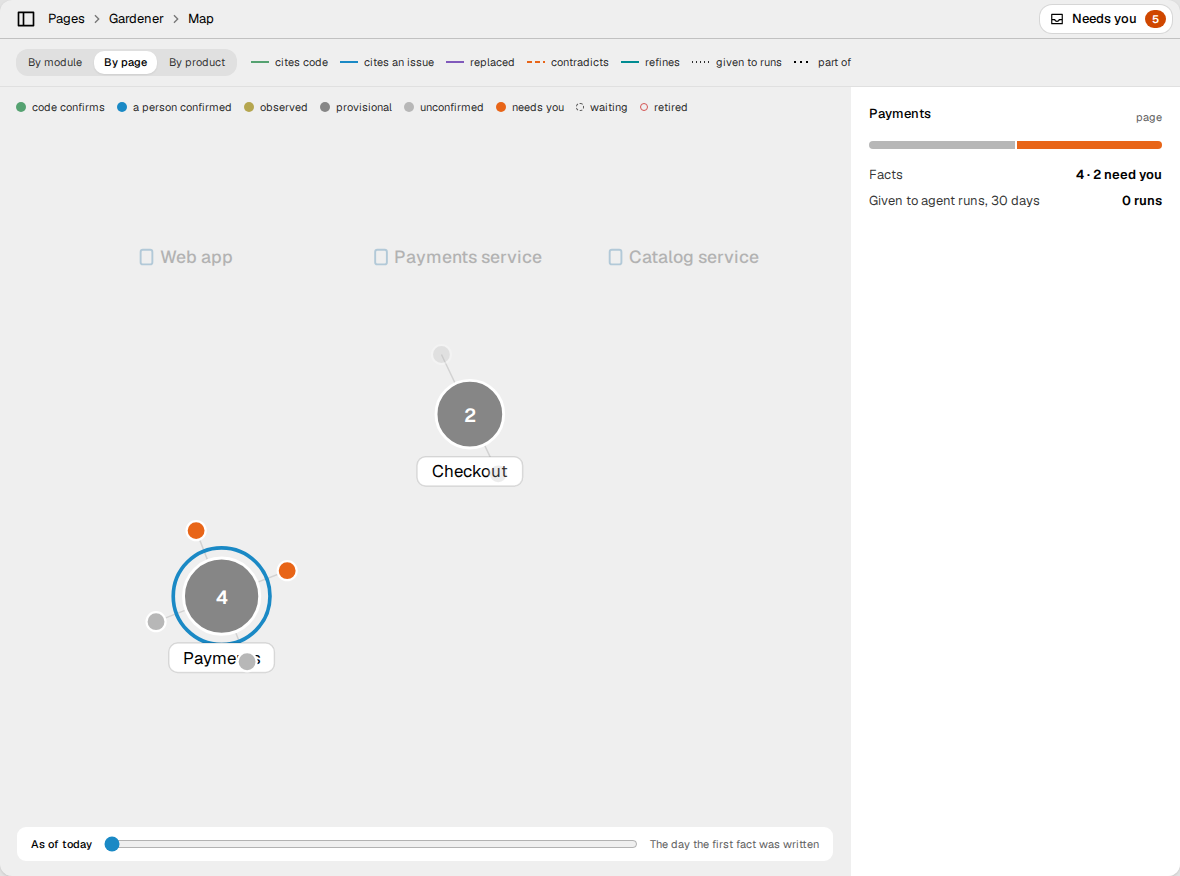
- By module, By page and By product put the facts around their module, their page or their product. By module is the default. Facts with no group go under a hub such as "In no module".
- Each circle is a fact. Its colour is its state: code confirms, a person confirmed, observed, provisional, unconfirmed, needs you, waiting, or retired. The legend gives each colour.
- Each square is a cited file, a cited issue, or an agent run. A run is green if it went well with its facts, and red if it went wrong.
- The lines show what a fact cites, what it replaced, what it contradicts or refines, and the runs that got it.
- Click a node to see its details, and to dim the nodes that are not near it.
- Drag the time slider back to see the map on an earlier day. A past day shows the trust that each fact has today. The map shows "needs you" only for today.
The map shows a maximum of 40 runs.
Trace a run
Click Trace a run → on the Gardener screen, and then select a run in Pick a run. The trace shows why the run got the facts that it got:
- Asked: the modules of the issue and their neighbours, or the text of the question.
- Found: the facts in those modules, in the neighbour modules, and the facts that matched the issue text.
- Kept: the facts that remain after the server drops the facts that are not in use or that nothing supports.
- Ranked: the conventions of the modules first, then the order of the search.
- Given: the facts that the run got, and the tokens that they used of the token budget.
The table shows each fact, its tokens, and what happened after the run. A fact that the run did not get shows why, for example "cut by the token budget". A run in the holdout says that it got no facts.
What the gardener proposes
The gardener never archives a fact that a person confirmed. It asks a person in Needs you, as a Retire? item. It asks when:
- a change to the default branch removes the file that the fact cites;
- a cited file changed, and no model could judge the change;
- the code now contradicts the fact, and a person confirmed it, or it is on a locked page, or a person put it back after an earlier dispute;
- a person confirmed the fact, and in
PAGE_STANDING_ENTRY_DECAY_DAYSno run used it and no check found that a citation holds, and no page cites it; - runs went wrong with a convention from review, and a person confirmed it, or it is in a page body, or it is on a locked page.
Agents get the fact until a person decides. Retire it archives the fact.
Keep it in use declines the request. The gardener then does not ask again
for the same reason for PAGE_STANDING_ENTRY_DECAY_DAYS.
A Page rewrite item in Needs you says "The gardener proposes a rewrite". No gardener job writes a rewrite. An agent or a person proposes it. Read Consolidation.
Upkeep
The gardener also adds to the bank. Triage decides each entry that the gardener writes, as it decides an entry from an agent.
- Conventions from review. When the reviewer gives the same finding in
KNOWLEDGE_CONVENTION_MIN_RUNSseparate agent runs in one module, the server proposes it as a convention there. The server writes it asPROPOSED. When triage ison, triage can accept it, or put it in use as provisional. In the other modes, a person decides. If a convention proposed this way leads to more harmful outcomes than helpful ones, byKNOWLEDGE_CONVENTION_HARM_MARGIN, it is archived, and the module's team gets an issue. A person can put it back. If a person confirmed it, or it is in a page body or on a locked page, the gardener asks a person instead. - Knowledge gaps. The server records the questions that the bank could not
answer. A question asked two or more times shows on the Pages home and in
Needs you. A question asked
KNOWLEDGE_GAP_ISSUE_MIN_COUNTtimes gets an issue, titled "Knowledge gap:" and the question, on the team that owns the module it names. The job runs onKNOWLEDGE_GAP_ISSUES_CRON. The question counts as answered when an entry that cites the issue is accepted.
Generated pages
A generated page answers a question from the entries in its scope. You make
one through the API: POST /api/v1/pages with "kind": "GENERATED" and a
question, and no body. Link it to the modules, products or capabilities that
it covers.
- Sections cite entries. The body is a list of sections. Each section
cites the entries that it was written from. Under the body, the webapp
lists them section by section, each with its trust tier, and says which are
no longer in use. Agents get the same from
read_page. - Rebuilt only when the evidence changes. Each hour
(
KNOWLEDGE_PAGE_REFRESH_CRON), the server looks at each generated page. It rebuilds a page only when the entries in its scope changed, and no sooner thanKNOWLEDGE_PAGE_REFRESH_MIN_INTERVALafter the last build. - A new question is a new page. When you change a page's question, the server rebuilds it for the new one. It does not wait for an entry to change. The minimum interval still applies: the rebuild runs once it has passed since the last build, even with the hourly look turned off. Every new question gets its own build, even while an earlier one still waits or runs. A build that cannot reach the search index or the model is tried once more, and after that is left to the hourly look.
- Edits, not rewrites. A model proposes edits to single sections: replace one, insert one, or remove one. A section that no edit names stays exactly as it was. A new section can cite only the entries that the refresh read. If the refresh finds no evidence, it writes nothing. Without a model, the server only removes the sections whose entries are all out of use or out of the page's scope (after a link is removed, for example).
- Only what changed is rewritten. Each section records what it was written from: the question and what its entries said. A refresh can replace or remove a section only when that has changed. The server drops any other replace or remove, so what new entries add goes into new sections, and one refresh can never rewrite the whole page.
- History. Each refresh is recorded in the page's history, with the body from before it. Revert a refresh like any other change.
- Take it over by hand. In the webapp a generated page is read-only. To edit it, click Take over by hand in the page menu. It then becomes an authored page, and the server stops the rebuilds. Only a person can take a page over; the server refuses an agent.
Which model the gardener uses
- The model of the deployment. The triage judges, the citation judge and
the writer of generated pages use the system model:
LLM_MODEL, andLLM_MODEL_DECISIONSfor decisions. The operator sets these. Read Self-deployment. - The model of the workspace. The verifier uses the model and the key in the workspace's agent settings. Read The verifier.
Triage needs a model for two tasks only: to compare a fact with similar
entries, and to judge the citations that it can read. If a fact needs one of
these tasks and there is no model, triage sends the fact to a person with the
reason NO_LLM.
The citation judge cannot judge a changed citation, so the gardener asks a
person. Decay, gap issues and conventions from review need no model.
Agreement
People check triage in turn, so that it acts alone only while people agree with it. Audits are one source of these checks.
A person's action on an entry that triage decided about is a verdict:
accepted, rejected, or edited. Verdicts come from answers to audits, and from
people's decisions on the entries that wait for them. In shadow mode, every
entry waits for a person, so every decision can be compared.
For each type of decision (accept, corroborate, refuse, provisional and
escalate), the server measures how far triage and people agree, as Cohen's
kappa, over the verdicts of the last KNOWLEDGE_KAPPA_WINDOW_DAYS days. See it in Settings → Agents,
under "Can triage decide alone?".
Back-off
When a type's kappa falls below KNOWLEDGE_KAPPA_FLOOR, over at least
KNOWLEDGE_KAPPA_MIN_SAMPLES verdicts, that type stops its actions. Its entries go
to a person with the reason LOW_AGREEMENT. It acts again when its kappa is
at the floor or above, over at least the minimum number of verdicts. With
fewer verdicts, the state stays as it is: a type resumes on evidence, not
because its old verdicts leave the window. Escalation is measured, but never
backs off. Each change is recorded with the figures it was made on.
The holdout
A share of hosted agent runs, KNOWLEDGE_HOLDOUT_RATE, is given no knowledge.
These runs are the holdout arm; the other runs are the treatment arm.
The server picks the arm from a hash of the run id, and a holdout run records
no use of any entry.
Settings → Agents, under "Does knowledge help?", compares the two arms:
finished runs, checks passed, review passes, cost per run, and pull requests
merged. The sample size comes first. For a long time an arm is only a few
runs, and a percentage of a few runs is noise. Set the rate to 0 to give
every run the knowledge, and measure nothing.
Settings
The operator of the server sets these values. No screen of the webapp changes them.
Set each value on the server as an environment variable. A workspace can set
its own value, which wins over the server's, under knowledge in its
preferences, with the key shown. An admin sets them with
POST /api/v1/workspaces/preferences and a body such as
{"knowledge": {"holdoutRate": 0.2}}. The knowledge object replaces the one
that is stored, so send every key that you want to keep. A value that cannot be
read is ignored, and the next layer applies.
| Variable | Default | Workspace key | Meaning |
|---|---|---|---|
KNOWLEDGE_AUTO_TRIAGE | shadow | autoTriage | off, shadow (decide and record, do not act) or on. |
KNOWLEDGE_AUDIT_RATE | 0.1 | auditRate | The share of triage's own decisions sent to a person as audits, from 0 to 1. |
KNOWLEDGE_KAPPA_FLOOR | 0.6 | kappaFloor | Below this kappa, a decision type escalates, and does not act. |
KNOWLEDGE_KAPPA_MIN_SAMPLES | 20 | kappaMinSamples | The verdicts a decision type needs before the floor applies. |
KNOWLEDGE_KAPPA_WINDOW_DAYS | 30 | kappaWindowDays | The days of verdicts that agreement is measured over. |
KNOWLEDGE_HOLDOUT_RATE | 0.1 | holdoutRate | The share of hosted runs given no knowledge, from 0 to 1. |
KNOWLEDGE_CONTEXT_TOP_K | 5 | contextTopK | The relevant entries in a run's context, after the conventions. |
KNOWLEDGE_CONTEXT_TOKEN_BUDGET | 1500 | contextTokenBudget | The tokens that a run's knowledge may take, at most 20000. |
KNOWLEDGE_SIMILARITY_THRESHOLD | 0.25 | similarityThreshold | How alike two entries must be, from 0 to 1, before triage asks a model how they relate. |
KNOWLEDGE_CONVENTION_MIN_RUNS | 3 | conventionMinRuns | The separate runs with the same review finding before it becomes a candidate convention. |
KNOWLEDGE_CONVENTION_HARM_MARGIN | 3 | conventionHarmMargin | How far harmful outcomes must outnumber helpful ones before a candidate convention is archived. |
KNOWLEDGE_GAP_ISSUE_MIN_COUNT | 5 | gapIssueMinCount | How often a question must be asked before it gets an issue. |
KNOWLEDGE_GAP_ISSUES_CRON | 0 4 * * 1 (weekly, Monday 04:00) | gapIssuesCron | When gap issues are opened. off disables the job. A workspace can only set off: one job serves every workspace. |
KNOWLEDGE_PAGE_REFRESH_MIN_INTERVAL | 6h | pageRefreshMinInterval | The least time between two builds of one generated page, such as 90m, 6h or 1d. |
KNOWLEDGE_PAGE_REFRESH_CRON | 23 * * * * (hourly) | none | When the server looks for generated pages to rebuild. off disables it, and a page is then built only when it is made or its question changes (after the minimum interval), and a build that failed twice is not tried again. |
These settings of the knowledge bank existed before, and apply to every workspace:
| Variable | Default | Meaning |
|---|---|---|
PAGE_PROPOSED_ENTRY_BUDGET | 10 | The proposed entries that one token may leave on one curated page. |
PAGE_PROPOSED_ENTRY_EXPIRY_DAYS | 30 | How long a proposed entry waits before decay archives it. |
PAGE_PROVISIONAL_ENTRY_DECAY_DAYS | 60 | How long a provisional entry may go unused before decay archives it. |
PAGE_STANDING_ENTRY_DECAY_DAYS | 90 | How long a standing entry may go unused before decay archives it. |
PAGE_DECAY_CRON | 0 3 * * * (nightly) | When the decay pass runs. off disables it. |