Definition of Done
Overview
The Definition of Done of an issue is a list of criteria. Each criterion is one condition that the work must meet. A person or an agent ticks a criterion when the work meets it.
The Definition of Done is below the description on the issue page. Its header shows how many criteria are ticked, for example 1/3, and a progress bar.
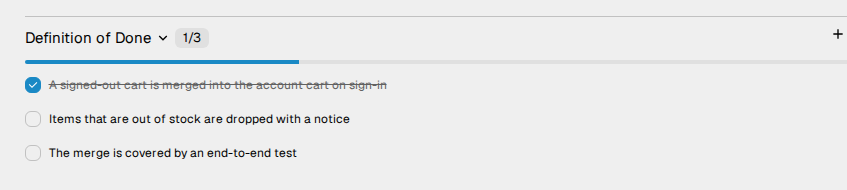
How to add a criterion
- Open the issue.
- Next to Definition of Done, click +.
- Type the criterion in Add a criterion....
- Press
Enter. The field stays open for the next criterion. - To stop, press
Esc.
Write each criterion so that a reader can check it. For example: "The merge is covered by an end-to-end test".
The new issue dialog has no field for criteria. Add them after you create the issue.
How to change a criterion
- Tick or untick. Click the checkbox. Vantik records who ticked the criterion, and when.
- Edit. Click the text, change it, and press
Enter. PressEscto cancel. - Delete. Put the pointer on the criterion, and click the bin icon. Vantik deletes the criterion immediately, with no confirmation.
You cannot change the order of the criteria in the webapp. A new criterion goes to the end of the list.
Each member who can see the issue can add, change, tick and delete its criteria.
When you complete an issue
If you move an issue to a completed status, and some criteria are not ticked, Vantik shows the dialog Definition of Done not met. Vantik shows it when you change the status in the list, on the board, in the spreadsheet, or at the right of the issue page. It tells you how many criteria are not ticked. Click Complete anyway to complete the issue, or click Cancel.
The S shortcut does not show this dialog. It completes the issue
immediately. Read Keyboard shortcuts.
How agents use the Definition of Done
- An agent that uses the MCP server reads the criteria with
get_task. It ticks or unticks them, or adds a criterion, withupdate_criteria. Read How to connect an MCP client. - An agent run gets the criteria that are not ticked, as the standard for its work. The reviewer of the run checks the work against each criterion. If the run succeeds, Vantik ticks the criteria that the agent reports as met. The comment at the end of the run tells how many criteria are ticked, and lists the criteria that are still open. Read The review cycle.
The page of an agent run also shows the Definition of Done of its issue.