How to connect an MCP client
Vantik speaks the Model Context Protocol. An
LLM agent therefore creates, picks up, notes, and closes an issue, and it
searches the past work. Claude Code, Cursor, and any other client with MCP can
do this, and you connect no REST endpoint by hand. The server gives a set of
tools with the shape of a task. The difficult parts happen on the server: it
finds the id of ENG-42, it converts the markdown, and it posts a resolution
before it closes an issue.
The endpoint is:
POST /v1/mcp
It is a stateless MCP server with the
Streamable HTTP
transport. It uses the same
authentication with a personal access token as the other parts
of the API. The token travels in the Authorization header.
How to get a token
Make the token on your own account settings:
- Open Settings.
- Under My account, click API. The page is API & Agents.
- In Access tokens, type a Name, for example
Claude Code. - In Acts as, keep Its own identity — an agent.
- Select the Role. The default is Read and write.
- Click Create.
- Copy the token. Vantik shows it one time only.
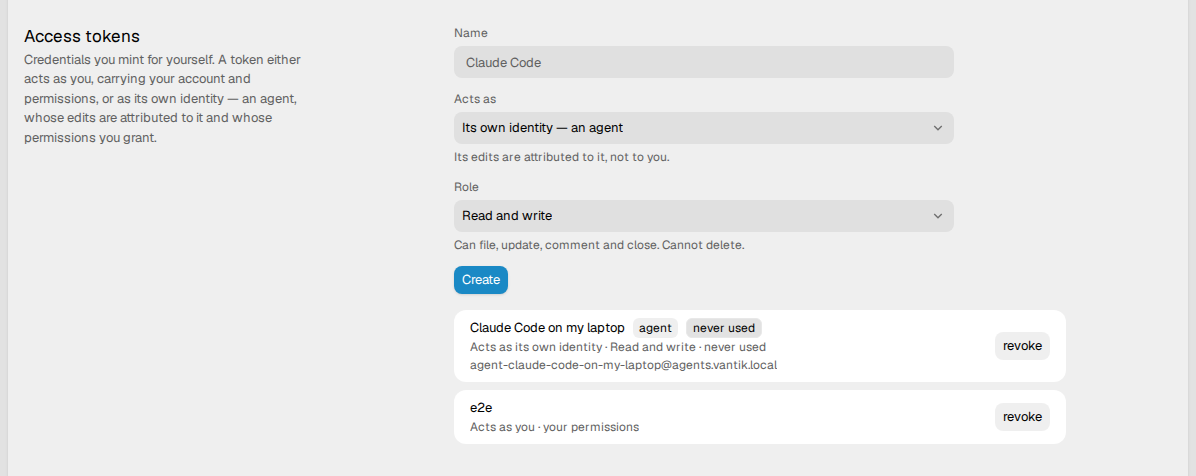
With Its own identity — an agent, Vantik makes a personal agent. An agent is a separate identity in the workspace. The workspace therefore records each issue and each note against the agent, and not against you. With You, the token acts as you, with your permissions.
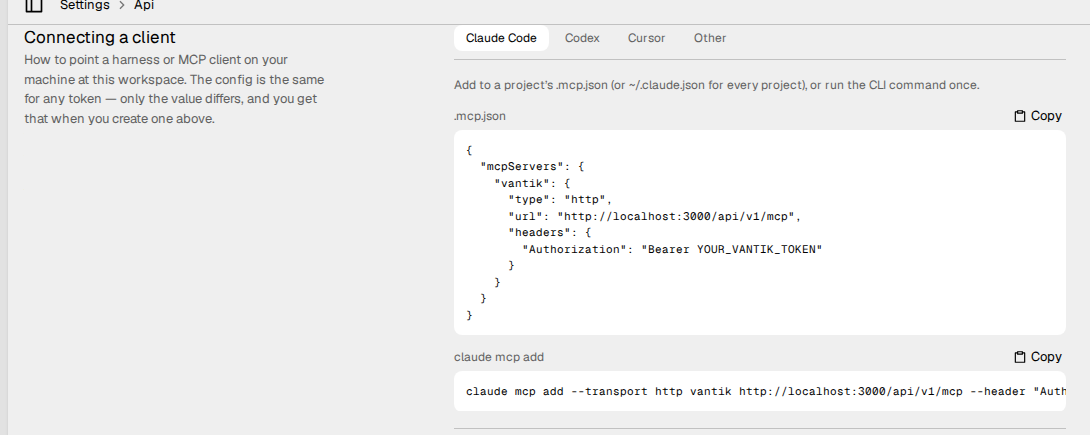
Below the tokens, Connecting a client shows the .mcp.json file, the
claude mcp add command, the skills and the hooks for each client. After you
make a token, these blocks contain it until you click Done. Copy them at
that moment, because you cannot read the token again.
Personal agents and workspace agents
| Kind | Who can make it | Token |
|---|---|---|
| Personal agent | Any member of the workspace. It belongs to the person who made it. | Vantik shows its token one time, when you make it. |
| Workspace agent | Only an admin, with "ownership": "workspace" on POST /v1/users/agents. The webapp has no control for it. | Vantik never makes a token for it. |
Connect your MCP client with a personal agent. A workspace agent has no token, so it cannot connect. Read Personal agents and workspace agents.
How to connect Claude Code
Add the server to the .mcp.json file of a project. Use your own host and your
own token:
{
  "mcpServers": {
    "vantik": {
      "type": "http",
      "url": "https://your-vantik-host/api/v1/mcp",
      "headers": { "Authorization": "Bearer tg_pat_…" }
    }
  }
}
You can also register the server from the command line:
claude mcp add --transport http vantik https://your-vantik-host/api/v1/mcp \
  --header "Authorization: Bearer tg_pat_…"
Do not commit a live token. The .mcp.json file of a project usually goes into
version control, and this file holds a token that reads and writes the
workspace. Keep the file out of version control, or register the server for your
user only. claude mcp add writes to ~/.claude.json, which is not in the
repository. If a commit does hold a token, revoke it, and make a new one. Click
revoke on its row in Access tokens. An admin can also revoke or
disable an agent in the Agent accounts section of Settings → Agents.
How to connect another client
Any MCP client with the Streamable HTTP transport connects in the same way.
Point it at https://your-vantik-host/api/v1/mcp, and send the token in an
Authorization: Bearer header. The /api prefix is the webapp proxy in front of
the server. If you call the server directly, remove that prefix and use
/v1/mcp.
Name the session that reads the knowledge
Vantik records each knowledge entry that it serves, so that it can learn which entries help the work. The record holds the token, and it holds the session of the agent when the agent names one. The MCP endpoint keeps no session, so the agent names its session in one of two ways:
- Pass
sessiontorecall_knowledgeor toload_context. This is the same argument thatremembertakes. - Send an
X-Vantik-Sessionheader with each request. Use this for a client that serves one session and can set a header for it.
Either way, a session is printable ASCII characters with no spaces, at most 200 of them. These rules apply to a value that is not correct:
- A
sessionargument longer than 200 characters makes the tool call fail. - Vantik ignores each other value that is not correct, and it still serves the
knowledge. This includes an
X-Vantik-Sessionheader of any length.
If the agent names no session, the record holds only the token.
The tools
The server gives 39 tools to each client. A tool that takes a task takes its
key, for example ENG-42, or its id. Each other reference takes a name or an
id:
| Reference | It takes |
|---|---|
| A team | Its identifier, for example ENG, its name, or its id. |
| A product or a module | Its key, its name, or its id. |
| A project or a capability | Its name or its id. |
| A page | Its title or its id. |
An item in pages_for and link_page | Its id. |
Tasks
| Tool | What it does | Parameters |
|---|---|---|
list_tasks | Lists the tasks as small rows, the most recently updated first. | team, assignee (an email, a name, or me), stateCategory, labels, priority, project, product, modules, capability, page, perPage (1 to 200). All are optional. product finds the tasks in the modules of the product. |
get_task | Gives all of one task in one call. That is the description, the Definition of Done, the notes and the history. It also gives the sub-tasks, the relations, the links, the modules and the capability. | task |
search_tasks | Searches the titles, the descriptions, and the notes. Set stateCategory: ["COMPLETED"] to find an earlier fix with its resolution. | query, and optional stateCategory, limit (1 to 100, default 10), modules, capability |
find_similar_tasks | Gives the earlier tasks that are similar to one task, and the resolution of each. | task |
create_task | Files an issue. It holds an issue to a minimum: a description of 40 characters or more, and acceptance criteria for a top-level issue. Each criterion becomes an item of the Definition of Done. | title, description, and optional acceptanceCriteria, team, state, assignee, labels, priority, parent, project, capability, modules |
update_task | Changes the title, the description, the state, the labels, the priority, the assignee, the project or the capability of a task. It cannot change the modules. When the part of an agent is done and a person must review the remainder, the agent sets the review state of the team with this tool. | task, and optional title, description, state, assignee, labels, priority, project, capability |
update_criteria | Ticks, unticks and adds the criteria of the Definition of Done. It refuses the call, and changes nothing, if an id is not on the task. | task, and optional tick, untick (criterion ids), add (new criteria) |
pick_up_task | Takes ownership of a task. It assigns the task and moves it to the first in-progress state of the team. An agent also uses it to take a task back from review. | task, and optional assignee (default me) |
add_note | Puts a markdown note on a task, and the search finds that note. | task, body |
close_task | Closes a task. It first records the resolution as a note, so the search finds the fix later. It moves the task to a completed state, and returns the Definition of Done. | task, and optional resolution, state |
stateCategory takes TRIAGE, BACKLOG, UNSTARTED, STARTED, COMPLETED
and CANCELED. priority takes none, urgent, high, medium and low.
Projects
| Tool | What it does | Parameters |
|---|---|---|
list_projects | Gives the projects of the workspace. A project is an objective, and the issues group under it. | None |
create_project | Opens a project for an objective that truly needs several issues. A project with no teams belongs to every team. | name, and optional description, status, startDate, endDate, teams |
update_project | Changes a project. teams replaces the teams of the project. | project, and optional name, description, status, startDate, endDate, leadUserId, teams |
Product axis
Read Products, modules and capabilities.
| Tool | What it does | Parameters |
|---|---|---|
list_products | Gives the products of the workspace. | None |
list_modules | Gives the modules, each with its repositories and its paths. | None |
list_capabilities | Gives the capabilities, each with its modules. | None |
create_product | Adds a product. | name, and optional key, description, status |
update_product | Changes a product. | product, and optional name, key, description, status |
create_module | Adds a module. A module has one owner: a team or a product. | name, and optional key, description, status, ownerTeam or ownerProduct, linkedTeams, linkedProducts |
update_module | Changes a module. A new owner replaces the old owner. The linked teams and products replace the old ones. | module, and optional name and the optional fields of create_module |
add_module_repo | Links a repository to a module. A connected source must offer the repository. If no source offers it, a person must connect the source in Settings → Integrations. | module, repository (owner/name), and optional pathPrefixes, isDefault |
update_module_repo | Changes the paths of a linked repository, or makes it the default. | module, repository, and optional pathPrefixes, isDefault |
create_capability | Adds a capability. | name, and optional description, status (planned, active, live or deprecated; default planned), modules |
update_capability | Changes a capability. modules replaces its modules. | capability, and optional name, description, status, modules |
Knowledge
Read Knowledge.
| Tool | What it does | Parameters |
|---|---|---|
load_context | Gives what the bank knows about an area, within a token budget, with the trust and the citations of each item. Call it before the work starts. | Optional task (what you are about to do), scope, tokenBudget (200 to 20000, default 2000), moduleIds, issueId, session |
recall_knowledge | Answers a question from the page bodies and the facts, with the trust and the citations of each. | query, and optional scope, limit (1 to 50), kinds, moduleIds, issueId, session |
list_pages | Gives the pages of the workspace. | None |
read_page | Reads one page: its body, its parents and its facts in use. For a generated page, it also gives the question, the sections and the facts that each section cites. | page |
pages_for | Gives the pages that are linked to one item. | entityType (TEAM, PROJECT, ISSUE, PAGE, PRODUCT, MODULE or CAPABILITY), entityId |
link_page | Links a page to an item. | page, entityType, entityId |
remember | Writes one fact. The fact must be 15 to 600 characters, and a fact with no page needs a scope. If the server finds a fact that says nearly the same thing, it writes nothing and returns it. | content, and optional page, scope, kind (FACT, DECISION, CONVENTION or GOTCHA; default FACT), session, supersedes, distinct, citations |
write_page | Makes a page, or writes the body of the page with the same title again. | title, body, and optional parent, entryPolicy (OPEN, CURATED or LOCKED) |
consolidate_knowledge | Proposes a new page body that folds facts into it. The page does not change until a person accepts the proposal in Needs you. | page, body, and optional entryIds (default: every fact in use on the page) |
knowledge_gaps | Gives the questions that the bank could not answer, the most asked first. | None |
A fact that an agent writes with remember starts as PROPOSED. Other agents
get it only after triage or a person puts it in use.
Agent runs
| Tool | What it does | Parameters |
|---|---|---|
list_agent_runs | Gives the agent runs on one task, the newest first, with the status, the output and the stop reason of each. It only reads. An agent token sees only its own runs. | task |
No tool starts an agent run. Only a person starts a run, from the issue in Vantik. Read Delegate an issue to an agent.
Hooks
| Tool | What it does | Parameters |
|---|---|---|
hook_session_start | Gives the agent the list of its issues in progress again, after a compaction. | session_id, and optional harness, source |
hook_prompt_submit | Gives the first prompt the list of issues in progress, and gives each prompt the pages that match it. | session_id, and optional harness, prompt |
hook_tool_use | Counts the changes to files. | session_id, and optional harness, tool_name |
hook_stop | Can hold the agent one time before it stops. The reasons are an issue in progress with no update, work with no issue, and knowledge that the agent did not record. | session_id, and optional harness |
The hooks of your client call these tools. An agent must not call them. Read
Optional: hooks that keep the tracker current.
harness takes claude-code or codex. The default is claude-code.
The REST endpoints below the tools
Each tool calls the REST API with your token. The scopes of an agent token therefore apply to each tool. Read How to work with agents for the issue endpoints. The tools use these endpoints:
| Tools | Endpoints |
|---|---|
| Tasks | /v1/issues, /v1/issues/filter, /v1/issues/{id}, /v1/issues/{id}/context, /v1/issues/number/{number}, /v1/issue_comments, /v1/search, /v1/search/similar_issues, /v1/checklist_items, /v1/checklist_items/{id} |
| Projects | /v1/projects, /v1/projects/{id} |
| Product axis | /v1/products, /v1/products/{id}, /v1/modules, /v1/modules/{id}, /v1/modules/{id}/repos, /v1/modules/{id}/repos/{repoId}, /v1/modules/available_repos, /v1/capabilities, /v1/capabilities/{id} |
| Knowledge | /v1/knowledge/context, /v1/knowledge/search, /v1/knowledge/gaps, /v1/pages, /v1/pages/{id}, /v1/pages/related, /v1/pages/{id}/links, /v1/pages/{id}/consolidate, /v1/page_entries |
| Agent runs | GET /v1/agent_runs?issueId= |
| Hooks | POST /v1/agent-hooks/{event} |
| Names of teams, states, members, labels and projects | /v1/teams, /v1/teams/{id}/members, /v1/{teamId}/workflows, /v1/users, /v1/labels, /v1/projects |
Rate limits
The endpoint has a rate limit for each token. An agent in a loop therefore
limits only itself. Above the limit you get HTTP 429, a Retry-After header,
and a JSON-RPC error body. The body holds the same wait time in
data.retryAfter.
| Variable | Default | What it sets |
|---|---|---|
MCP_RATE_LIMIT | 120 | The number of requests that one token can make in one window. 0 stops the limit. |
MCP_RATE_LIMIT_WINDOW_MS | 60000 | The length of the window, in milliseconds. |
The counters live in the server process. Across several replicas, the real limit
is therefore the limit multiplied by the number of replicas. That is enough to
stop a loop that runs away. For a true quota, put your own limiter in front of
the server and set MCP_RATE_LIMIT=0.
Optional: a house style, as agent skills
The configuration above is all that an agent needs to read and to file an issue. But an agent alone files many small issues. It opens a new issue where a note on an issue that exists is enough, and it divides one piece of work into six issues.
Vantik has two short guides that correct this. Each guide is an agent skill:
- working-vantik-issues says to file fewer and larger issues. It says to group the issues of one objective under a project. It says to add a note to an issue that exists, and not to open a near-duplicate. It also says to write the definition of "done" before you file the issue.
- working-vantik-knowledge says to load the context of the knowledge bank before the work starts, and to record one fact at a time.
The issues guide sits above the create_task tool, and that tool already
refuses an issue with no description or no acceptance criteria. The tool sets
the minimum. The guide gives the judgement about what to file.
Each Vantik server publishes its guides at /.well-known/agent-skills/, in the
format of the Agent Skills discovery index. Install them with the
skills CLI. Use your own host:
DISABLE_TELEMETRY=1 npx skills add https://your-vantik-host
The command asks which guides to install, for which agents, and whether to
install them for this project or for all your projects. It knows where each
agent keeps its skills: Claude Code, Codex, Cursor, and many more. To name the
agent, add --agent claude-code, --agent codex, or --agent cursor. Each tab
in Connecting a client shows the command with its agent.
After you upgrade Vantik, run npx skills update. The guides name the tools of
your server, so the copy from your server is the copy that matches it.
DISABLE_TELEMETRY=1 stops the skills CLI from sending a report of the install.
For a source that is not a public GitHub repository, that report holds the name
of your host.
You can also install the guides from the Vantik repository on GitHub, for example to read them before you have a server:
npx skills add cmunte132/vantik
That copy follows main, which can be ahead of the Vantik version that you run.
Always in the context
A skill loads on demand. Sometimes an agent still works quietly, and reports only at the end, because no part of the task looked like issue work until the task was complete. For that agent, add the issues guide to a file that the agent always reads:
# Claude Code
curl -fsSL https://your-vantik-host/api/v1/agent-skill/CLAUDE.md >> CLAUDE.md

# Codex, Cursor, and any other tool
curl -fsSL https://your-vantik-host/api/v1/agent-skill/AGENTS.md >> AGENTS.md
The server makes both files from one source text, so there is one source of
truth and not copies that become different. The originals are in
skills/ at the root of
the repository.
Always on: the server instructions
When a client connects, the MCP server sends a short form of the rules in the
instructions field of MCP. Claude Code and Codex keep that text in the context
for the whole session. An agent there therefore gets the rules even if it never
loads a skill: pick up the issue before the first edit, tick each criterion when
it is met, and close the issue with a resolution. You configure nothing for
this.
Optional: hooks that keep the tracker current
A skill is advice, and the agent decides when to read it. Hooks make these parts of the guidance certain:
- At the start of a session, the agent gets a list of the issues that it has in progress, with how much of each Definition of Done is met. After a compaction, the agent gets the list again. The list tells the agent to move an issue to the review state of its team when only a person can do the remainder. An issue in a started state after the first one, for example "In Review", is in a review state. The list shows such an issue apart, as an issue that waits for review. It tells the agent to close the issue itself when the person approves it. The list marks an issue with every criterion met as ready to close, and it shows when a person replied on an issue in review after the last update of the agent.
- On each prompt, Vantik compares the prompt with the knowledge bank. If
pages match closely, the agent gets their titles and an instruction to call
load_context. Vantik names each page one time in a session. It sends the titles only, and it does not count them as a use of the knowledge. - Before the agent stops, Vantik examines each issue that the agent has in progress. If the agent wrote to an issue in this session, and every criterion of the issue is met, Vantik holds the agent once and asks it to close the issue. Vantik does this for an issue in review too. Vantik does not examine an issue in a review state for updates. If an issue has had no update from the agent for 20 minutes of this session, Vantik holds the agent once and asks it to record where the issue stands. A note, a ticked criterion, or a change to the issue counts as an update. If the session did not touch the issue, the agent can say so in one line and stop.
- Before the agent stops, Vantik also finds work that has no issue. If the session changed files five times or more, and nothing is in progress under the name of the agent, Vantik holds the agent once. It asks the agent to find or file the issue and to record the work. If the change is too small for an issue, or the repository does not use Vantik, the agent can say so in one line and stop.
- Before the agent stops, Vantik also finds knowledge that the agent did not
record. If the session changed files ten times or more, and the agent wrote
nothing to the knowledge bank in that period, Vantik holds the agent once. It
asks the agent to record what the work taught, one fact for each
remembercall, and to supersede each entry that the work made false. A fact, a change to a page, or a proposal for a page counts as a write. If the work taught nothing new, the agent can say so in one line and stop. The session brief also tells the agent to record each fact when it learns it.
Vantik asks once for each quiet period. After the agent writes to the issue, a
new quiet period of 20 minutes can cause one more request. Vantik asks about
work with no issue one time in a session. Vantik asks about knowledge again only
after ten more edits. If more than one check applies at a stop, the agent gets
one message. The rules are on the server, so the
hooks only relay the answer. The hooks write nothing to the tracker. If Vantik
does not answer, the hook prints {}, and the agent continues as if there were
no hooks.
Each tab in Connecting a client shows the hooks for its agent, with your host already in them.
Claude Code and Codex
Both agents can call a tool on an MCP server from a hook. The hooks call the
hook_* tools on the vantik server that you configured above. They use its
connection and its token, so the file holds no secret, and you can commit it for
your team. Add this to .claude/settings.json:
{
  "hooks": {
    "SessionStart": [
      { "matcher": "compact",
        "hooks": [{ "type": "mcp_tool", "server": "vantik", "tool": "hook_session_start",
                    "input": { "session_id": "${session_id}", "harness": "claude-code", "source": "${source}" } }] }
    ],
    "UserPromptSubmit": [
      { "hooks": [{ "type": "mcp_tool", "server": "vantik", "tool": "hook_prompt_submit",
                    "input": { "session_id": "${session_id}", "harness": "claude-code", "prompt": "${prompt}" } }] }
    ],
    "PostToolUse": [
      { "matcher": "Edit|Write|MultiEdit|NotebookEdit",
        "hooks": [{ "type": "mcp_tool", "server": "vantik", "tool": "hook_tool_use",
                    "input": { "session_id": "${session_id}", "harness": "claude-code", "tool_name": "${tool_name}" } }] }
    ],
    "Stop": [
      { "hooks": [{ "type": "mcp_tool", "server": "vantik", "tool": "hook_stop",
                    "input": { "session_id": "${session_id}", "harness": "claude-code" } }] }
    ]
  }
}
For Codex, save the same hooks as .codex/hooks.json, and make two changes:
- Change each
"harness": "claude-code"to"harness": "codex". - Change the
PostToolUsematcher to"apply_patch". Codex makes each change to a file with that tool.
The brief comes with the first prompt, and not at SessionStart. At launch,
neither agent has connected its MCP servers when SessionStart runs, so an MCP
hook on that event does not run. After a compaction, the servers are connected,
so the compact hook runs. Codex asks you to trust a new hook before it runs
it.
Cursor
Cursor runs a hook as a shell command, so each hook is a curl command that
sends the input of the hook to Vantik. The command reads the token from
VANTIK_TOKEN, so the file holds no secret. Save this as .cursor/hooks.json,
and set VANTIK_TOKEN in the environment that starts Cursor:
{
  "version": 1,
  "hooks": {
    "sessionStart": [{ "command": "curl -fsS -m 10 -X POST 'https://your-vantik-host/api/v1/agent-hooks/session-start?harness=cursor' -H \"Authorization: Bearer $VANTIK_TOKEN\" -H 'Content-Type: application/json' --data-binary @- || echo '{}'" }],
    "beforeSubmitPrompt": [{ "command": "curl -fsS -m 10 -X POST 'https://your-vantik-host/api/v1/agent-hooks/prompt?harness=cursor' -H \"Authorization: Bearer $VANTIK_TOKEN\" -H 'Content-Type: application/json' --data-binary @- || echo '{\"continue\":true}'" }],
    "postToolUse": [{ "command": "curl -fsS -m 10 -X POST 'https://your-vantik-host/api/v1/agent-hooks/tool-use?harness=cursor' -H \"Authorization: Bearer $VANTIK_TOKEN\" -H 'Content-Type: application/json' --data-binary @- || echo '{}'" }],
    "preCompact": [{ "command": "curl -fsS -m 10 -X POST 'https://your-vantik-host/api/v1/agent-hooks/compact?harness=cursor' -H \"Authorization: Bearer $VANTIK_TOKEN\" -H 'Content-Type: application/json' --data-binary @- || echo '{}'" }],
    "stop": [{ "command": "curl -fsS -m 10 -X POST 'https://your-vantik-host/api/v1/agent-hooks/stop?harness=cursor' -H \"Authorization: Bearer $VANTIK_TOKEN\" -H 'Content-Type: application/json' --data-binary @- || echo '{}'" }]
  }
}
Cursor has three limits, and Vantik works around each one:
- Cursor cannot add context to a prompt or to a compaction. Vantik keeps the
page titles and the brief, and gives them to the agent after its next tool,
through
postToolUse. postToolUseruns after each tool, so it has no matcher. Vantik counts only the tools that change a file.- Cursor cannot hold an agent at a stop. Vantik therefore sends the reminder back as the next message, and Cursor submits it for the agent.
If Vantik does not answer a prompt hook, the command prints
{"continue":true}, so Cursor always sends the prompt. These commands need a
shell with curl, as on macOS and Linux.
Any other agent
The endpoint behind the hooks accepts any agent that can run a command at the start of a session and before it stops:
POST /v1/agent-hooks/{session-start | compact | prompt | tool-use | stop}?harness={claude-code | codex | cursor}
Send the input of the hook as the body, with the token in the Authorization
header, as for the other endpoints. The harness parameter selects the format
of the answer. The endpoint needs only the read scope. These fields in the
body are used:
| Field | Event | Use |
|---|---|---|
session_id or conversation_id | All | Identifies the session. This field is necessary. |
prompt | prompt | Vantik compares it with the knowledge bank. |
tool_name | tool-use | Vantik counts the tool as an edit if it changes a file. |
source | session-start | The value compact keeps the clock of the session. |
stop_hook_active | stop | The value true lets the agent stop. |
The MCP hook tools call this endpoint, and each call from them counts toward the MCP rate limit: one request for each prompt, each stop, each compaction, and each change to a file. The limit is 120 requests each minute for each token.