Run an agent on your machine
Overview
The local connector lets an agent run on your computer. You start it with
vantik connect. It is a process that stays open in a terminal. While it
runs, you can delegate an issue to your machine, and the connector does
the work with your own omp (oh-my-pi).
A run on your machine is different from a run in the Vantik sandbox:
- omp uses your logins and your models. The workspace needs no model key.
- The work happens in a git worktree on your disk. The run does not touch the checkout that you work in.
- The run acts in Vantik as your personal agent. Vantik makes this agent the first time that you use it.
- The run leaves a local branch. It does not push anything, and it does not open a pull request.
Only a person can start a run. You start it from the issue in Vantik, as for a run in the sandbox. Read Delegate an issue to an agent.
Before you start
These items must be ready:
- The Vantik CLI, signed in. Read
How to sign in. If you are not signed
in and you run
vantik connectin a terminal, the command starts the browser sign-in. Without a terminal, it stops and tells you to runvantik login. - omp, on your
PATH. Vantik tests the connector with omp 18.8.6 up to, but not including, 18.9.0. A different version still connects. The connector prints a warning, and the delegate control shows that your omp is not a version that Vantik is tested with. The run can still work. - A login in omp. Run omp one time, and sign in to a model provider. If the
omp folder does not exist, the connector tells you to do this. The folder is
~/.omp/agent, or the folder inPI_CODING_AGENT_DIR. - git.
- A local repository. The run gets its repository from the modules of the issue, as in the sandbox. For a run on your machine, the repository must be a local repository. The connector runs git in the path that Vantik holds for that repository, so the path must exist on your machine. If the repository is on a git host, the run fails and says that it is not a local repository.
- A clear issue. The description must have at least 40 characters, as for all runs.
lsof, for the terminal features. The connector useslsofto see which omp sessions your terminal has open. Without it, the connector prints a warning, and Vantik cannot show if your terminal holds a session.
How to start the connector
-
Open a terminal.
-
Run the command:
vantik connect -
Wait for the line that starts with
Connected to. It shows the server, your user, your workspace and your omp version. The connector then waits for work.
Keep the terminal open. The connector reconnects by itself if the network drops.
The connector asks omp for the models that you can use, and asks again every 10 minutes. When you add a login in omp, the new models show in Vantik.
To stop the connector, press Ctrl-C. The connector cancels each active run,
and it waits up to 20 seconds for the runs to report. A second Ctrl-C quits
at once. The worktree of a cancelled run stays on your disk.
If the server does not accept your login, the connector prints the reason and
exits with code 1. Run vantik login, and try again.
To use a server that is not the one that you signed in to, read
vantik connect.
How to delegate to your machine
- Start
vantik connect. - Open the issue.
- Click Delegate to an agent.
- In Runs on, select Your machine (omp). The list shows this choice only while your connector is online. If it is the only place that can run the work, the popover states it and offers no list.
- Optional: type guidance in Anything the issue does not already say.
- Optional: select the Provider, the Model and the Reasoning effort. The lists show the models in your omp. Keep omp default to let omp choose. If you pick a model that your omp does not have, the run fails and says so.
- Click Start run.
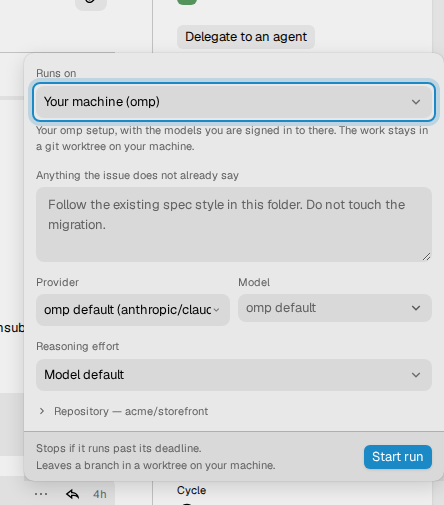
The footer of the popover says that the run stops if it runs past its deadline, and that it leaves a branch in a worktree on your machine.
The connector serves your runs only. A colleague cannot use your machine, and you cannot use theirs.
What a run does
When the connector takes a run, it does these steps:
- It makes a git worktree of your repository, at
~/.vantik/worktrees/<repository>/<issue key>. To use another folder, setVANTIK_HOME. The branch isagent/<issue key in lowercase>, for exampleagent/eng-42. It starts at the base branch of the run. - It starts omp in that worktree, with the prompt of the issue.
- It sends what omp does to Vantik, so the page of the run shows the steps live.
- When omp finishes, it commits what is left in the worktree to the branch,
with your git identity and the message
<issue key>: <issue title>. It skips your git hooks, because a hook that waits for a terminal would hang the run. - It tells Vantik that the run ended.
If the worktree or the branch exists from an earlier run on the same issue, the connector uses it. The run continues from the branch, and the work that you did in the worktree is not lost. The connector refuses a second run in a worktree that already has an active run.
The worktree stays after the run. The agent posts a comment on the issue that names the branch and the worktree. If the agent changed nothing, the run fails with "The agent changed nothing".
The token of the run
A run on your machine calls Vantik, so it needs a credential. It gets a token for your personal agent that is valid for this run only:
- The token expires 10 minutes after the deadline of the run.
- Vantik revokes the token when the run ends.
- The connector removes your own Vantik credential from the environment of
omp, and points the
vantikcommand of the run at an empty configuration folder. A shell command in the run finds no stored login. - The
vantikMCP server in the worktree uses the token of the run, not your own token.
If your omp has an MCP server on the same Vantik server under a different
name, omp loads it with your own token. The connector prints a warning and the
name of the file. Remove the server from mcp.json if a run must hold only its
own token.
Guardrails and limits
omp runs without a question for approval, because nobody is there to approve. The worktree is the boundary. The connector starts omp with your own extensions off, and loads the Vantik extension. The extension applies the same guardrails as in the sandbox:
- It refuses a change to a file outside the modules of the issue.
- It refuses a change to the CI configuration.
- It refuses a
gitcommand, because the connector commits the work. - It refuses a command that reaches a host that the policy does not list.
- It reminds the agent to run the checks of the repository before it stops, if the agent changed files and did not run them.
A run on your machine has no review cycle. Vantik does not run the checks of the repository after the agent, and no second agent reviews the work. Read The review cycle for what the sandbox does. Review the branch yourself.
Vantik enforces two limits: time and spend. The default time limit is 2 hours. The default spend limit is $5.00, and the delegation can set a lower one. When the run reaches either limit, the server stops the run and fails it. Vantik records the cost and the turns of the run, and the page shows them. Cost that your terminal work adds after the run ended does not change the result.
When the connector is not there
- If your connector disconnects, the run waits 2 minutes. If the connector does not come back, the run fails.
- If you stop the connector and start it again, the connector does not have the run. The run fails with "Your connector came back without this run".
Questions and Needs you
An agent can ask a person a question when it cannot decide. Your omp can also open a dialog that waits for a person, for example a choice or a confirmation. Vantik turns each of them into a question.
Questions go to Needs you. Read Questions from an agent. They work in the same way for a run on your machine as for a run in the sandbox. The question is assigned to you, because you delegated the issue. Vantik also tells you in your inbox. The page of the run shows the form above the activity. Anyone in the workspace can answer, and the first answer wins.
The agent waits 30 minutes for an answer. If nobody answers, the agent goes on with its own judgement and states what it assumed. A run can ask a maximum of 5 questions.
Continue a run in your terminal
A run on your machine uses an omp session. When the run ends, you can open that session in your terminal and go on with the work.
-
Open the page of the run.
-
In the card Continue in your terminal, click the copy button next to the command. The command has this form:
cd '/Users/you/.vantik/worktrees/your-project/ENG-42' && omp --resume <session id>The
cdis there because omp keeps its sessions by the folder where they ran. -
Paste the command in a terminal, and press Enter.
The same command shows under the session in the Sessions panel of the issue.

Who holds the session
omp keeps a lock on a session while a process has it open. The connector looks at these locks every 15 seconds, and tells Vantik who holds each session:
- Your terminal. The title of the card is Open in your terminal.
- Vantik. A run of the connector drives the session. The card says Vantik is driving.
- Nobody. The card shows no holder.
The connector never writes to a session that your terminal holds. If it did,
omp would copy the session to a new file, and your terminal would not see the
change. If the connector cannot check the locks, because lsof is missing, it
treats the session as held.
How terminal work shows on the issue
When you work in the session, the connector reads the omp session file every 5 seconds and sends the new work to Vantik. The page of the run shows it as one more part of the activity, with the heading Continued in your terminal. The heading shows the number of turns and the time of the last one. The card changes to Resumed in your terminal, and it shows how many turns you took since the run ended. While you work, the Now card says Working in your terminal. The replies of omp have the label omp.
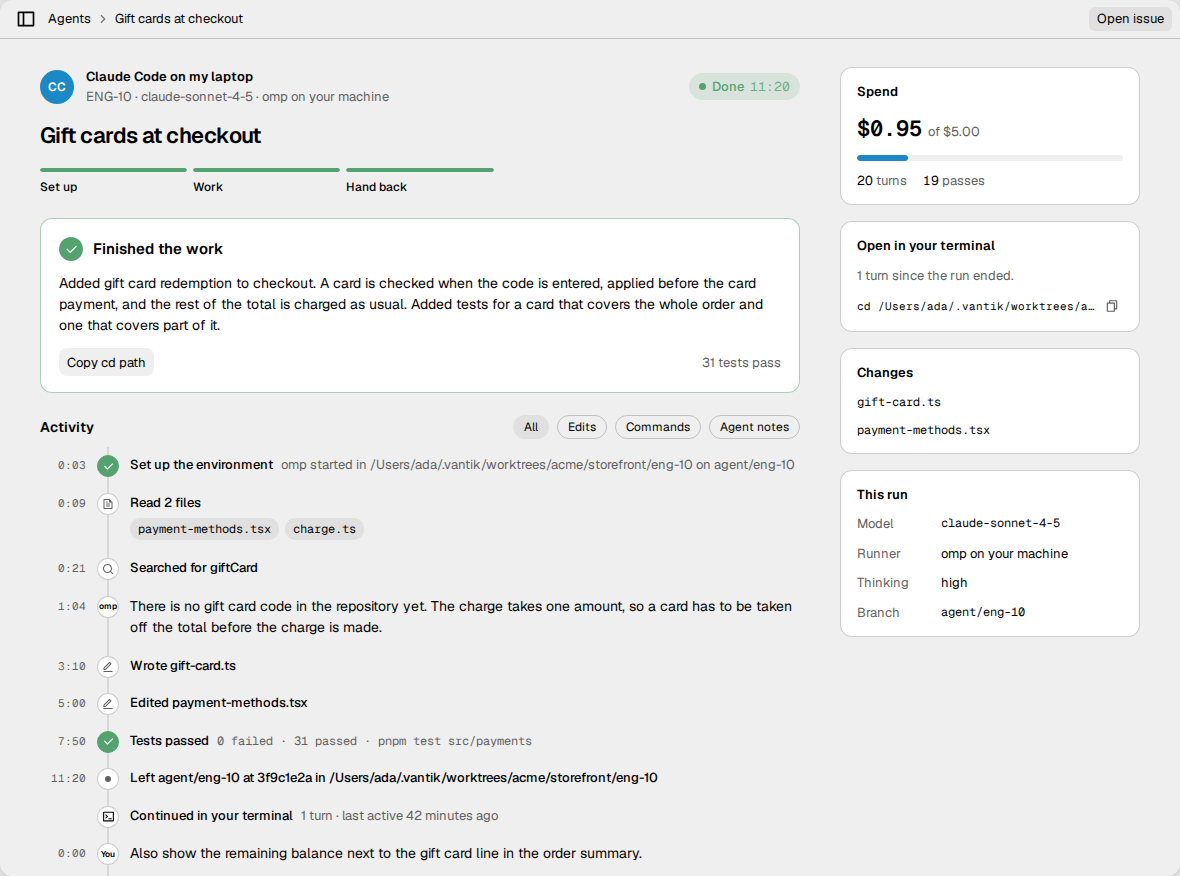
These rules apply:
- The work counts from the first prompt that you send after the run ended. What omp wrote while it shut down is not counted.
- The turns and recorded cost estimates of terminal work add to the run's totals. Subscription estimates are API-equivalent valuations, not bills.
- The connector sends slim messages, tool results, model changes, auxiliary usage, and native child-session usage. It does not send provider request payloads or session context. A text longer than 16 KB is cut.
- Vantik keeps the newest 2000 steps of terminal work for a run.
- Vantik mirrors terminal work only while
vantik connectruns. When you start the connector again, it sends what you did in the meantime. It keeps its position in the filesession-offsets.json, in the configuration folder of the Vantik CLI. It moves the position only after Vantik confirms that it has the work. - The connector looks at the sessions that Vantik saw active in the last 24 hours.
Terminal sessions without a run
You can use omp in a terminal on an issue, without a run. If your omp reports to Vantik with the hooks, the session shows in the Sessions panel of the issue, after the agent picks up the issue with its session id. Read Optional: hooks that keep the tracker current.
While vantik connect runs, the connector mirrors the work of this session in
the same way. The row shows the number of turns in your terminal and the time
of the last one. Click the row to open omp · Local: activity, which shows
the steps in the same form as the page of a run.
Usage attribution
The session activity dialog separates subscription API-equivalent estimates from metered-route estimates. Calls without a known amount are counted but excluded from monetary totals. Neither figure is an invoice or a measurement of subscription quota.
One root session has one canonical usage record, even when it works on several issues. A pickup or a write to another linked issue changes the assignment; reading an issue does not. A child's usage stays with the issue active when that child started. Native child files and auxiliary requests are included once; external Claude results contribute only their incremental estimate, not the cumulative conversation total again.
Replay and reconnect do not add the same calls or visible steps twice. Whole-session amounts are private to the session owner; issue-visible collaborators see only that issue's ledger. Work without a resolved issue assignment remains separate.
Amounts recorded before canonical tracking are explicitly unverified and kept apart from the new ledger. Installing this feature does not reprice or repair historical totals. Hosted sandbox provider-metered reconciliation is a separate accounting path.
Use a Claude subscription worker from omp
The optional claude_delegate extension runs the unmodified Claude Code CLI as
an external worker. It is not an Anthropic model provider or a hosted Vantik
executor. Claude Code handles its own subscription login and usage limits;
the extension does not extract OAuth credentials or fall back to API keys.
Install Claude Code and sign in with your own subscription:
claude auth login --claudeai
From a Vantik source checkout, build and install the self-contained extension:
pnpm --filter @vantikhq/cli run build:main
mkdir -p ~/.omp/agent/extensions
cp packages/cli/dist/pi-extension/claude-delegate-extension.js \
  ~/.omp/agent/extensions/vantik-claude-delegate.js
Start a new omp session. These commands check the setup:
/claude-status
/claude-smoke
/routing-status
/claude-status checks the native login without inference. /claude-smoke
makes a small, tool-free Haiku request using the same execution path as the
delegation tool. A status reporting a login does not prove its token is still
valid; a revoked token requires signing in again through Claude Code.
The primary agent can call claude_delegate with an assignment, an intent
(execution, reasoning, or review), a working directory, and a tool
profile. The default model is claude-haiku-5-5; an explicit model overrides
that default. Profiles are none, read (the default), and edit. The edit
profile adds file editing and writing, not shell commands or further agent
spawning. The primary agent remains responsible for running verification.
Workers use Claude's safe and restricted modes with no inherited hooks, MCP servers, skills, or project instructions. Include the relevant instructions and acceptance criteria in each assignment. File tools are confined by Claude's restricted-mode rules to the selected working directory.
To continue a worker, pass its claudeSessionId as resumeSessionId. A local
metadata-only checkpoint is required: resumed results report a cumulative
conversation total, so the extension attributes only its growth. Repeated
invocations fail before inference rather than repeat completed work. The
checkpoints contain session identifiers and cost totals, not prompts or
credentials.
Checkpoints live under ~/.omp/agent/claude-delegation. An abruptly stopped
process can leave a session lock. The extension refuses a held lock rather
than risk concurrent work; remove a stale lock only after confirming that no
Claude worker for that session is still running.
The extension also supplies advisory routing context from omp's cached Codex
quota history. It does not poll providers before each task or infer quota from
dollars. Missing, stale, and reset-window observations remain unknown. Model
choices named explicitly are not replaced. Provider-error fallback is distinct
from escalating work that failed verification. After checking a delegation,
the primary can record verified, needs_rework, failed, or escalated
with delegation_outcome; completion alone is not verification.
Claude's total_cost_usd and per-model costBasis: list are API-equivalent
estimates, not cash charges or subscription quota. Account-level paid extra
usage, if enabled in Claude, remains governed by the account's settings; this
extension does not change those settings.
Limits
- A run on your machine needs the connector, and the connector needs your computer to be on and online. There is no fallback to the sandbox.
- The repository path must exist on the machine of the connector. A server on another machine works, because the connector connects to its address, but the path of the local repository must be the same on your machine.
- A run leaves a branch on your disk. Vantik does not push the branch, and it does not open a pull request. Push the branch yourself.
- Only one run can be active in one worktree. This means one run for each issue and repository on one connector.
- You can start a run only from the issue in Vantik. The connector has no command to start one.